How to play chord progressions on iPhone without knowing music theory
A chord progression is just a few chords in a row that sound good together. The hard part on a phone is finding them: a piano app wants three fingers in the right places for every chord. With the still.synth app you hold a chord shape, tap a root, and the chord plays in your key. Here’s how to read the pads, six progressions to start with, and how to turn one into a loop with bass and drums.
Pick a key and a scale. The root pads are numbered with the steps of that scale. Hold Maj and tap a capital numeral (I, IV, V), or hold Min and tap a lowercase one (ii, iii, vi). Every chord you get that way fits the key. Try I – V – vi – IV first: it’s the progression under a huge number of pop songs.
Why pads and not a piano
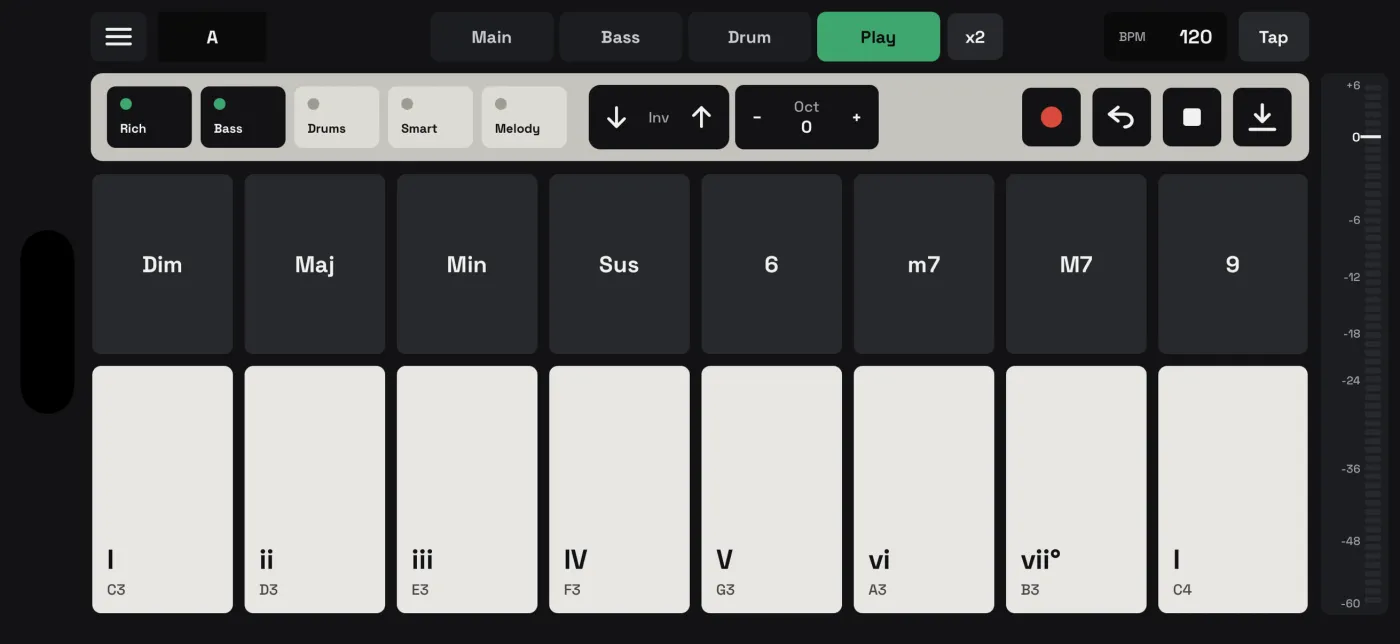
On a piano app every chord is a shape you have to know: which three notes, and where. On a small screen that’s slow even if you play. still.synth splits a chord into two decisions. The top row of pads is the shape: Dim, Maj, Min, Sus, 6, m7, M7 and 9. The bottom row is the root, the note the chord is built on. One finger holds the shape, another taps the root, and the app plays the full chord.
The roots aren’t all twelve notes. They’re only the notes of the key you picked, so you can’t land on a root that doesn’t belong. That’s what lets you find a progression by ear without stopping to think about theory.
Playing roots from a MIDI keyboard instead of the pads works the same way. Any key, black or white, is moved to the nearest note of the scale (the lower one if two are equally close), so in C major C♯ plays as C. You can’t step outside the key.
Pick a key and a scale
Set the key and the scale on the Main tab. If you just want to start, take C and Major: that’s what the examples below use. For a darker mood, take A and Minor. Singing along? Change the key later; the pads move with it and every progression keeps its shape.
Read the pads: one shape, one root
Each root pad has a Roman numeral on it, the step of the scale, and the note name under it. The numeral also tells you which shape fits:
- Capital (I, IV, V): hold Maj.
- Lowercase (ii, iii, vi): hold Min.
- ° (vii° in Major, ii° in Minor): hold Dim. It’s tense, use it to lead into the next chord.
| Scale | Maj on | Min on | Dim on |
|---|---|---|---|
| Major | I, IV, V | ii, iii, vi | vii° |
| Minor | III, VI, VII | i, iv, v | ii° |
Once that feels easy, swap in some color. On a capital pad try M7 or 6 for a softer, jazzier chord. On a lowercase pad try m7. Sus works on most pads and leaves the chord hanging, so it wants to move on. A root with no shape held plays just that note with its octave.
Six progressions to try
All six in C major, one chord per bar. Hold the shape, tap the root, move on at the next bar. Then try the same pads in another key: the chords change, the pattern doesn’t.
| Progression | Chords in C | Pads |
|---|---|---|
| I – V – vi – IV | C – G – Am – F | Maj + I, Maj + V, Min + vi, Maj + IV. The big pop one. |
| vi – IV – I – V | Am – F – C – G | Same four chords, starting on the minor one. Sounds moodier. |
| I – vi – IV – V | C – Am – F – G | The old doo-wop loop. Maj + I, Min + vi, Maj + IV, Maj + V. |
| IV – V – iii – vi | F – G – Em – Am | Keeps pushing forward and never quite lands. Common in J-pop and anime songs. |
| ii – V – I | Dm7 – G – CM7 | m7 + ii, Maj + V, M7 + I. The jazz turnaround, two bars on the last chord. |
| I – IV | C – F | Two chords, two bars each. Good for a groove you’ll sing or play a melody over. |
Can’t decide what comes next? Start and end on I (or i in Minor), and before going home try V. Most progressions are some version of leaving I and coming back.
Progressions from real songs
The song pages have the key, the chords and the exact pads, bar by bar. A few to start with:
- Get Lucky (Daft Punk): F# minor, iv – VI – i – VII. One chord per bar, an easy first song.
- Take On Me (a-ha): A major, ii – V – I – IV, fast.
- Espresso (Sabrina Carpenter): A minor, iv – v, both on m7. Hold one shape and only move the root.
- The Less I Know the Better (Tame Impala): C# minor, i – VII – III – v.
More on the song pages.
Make it sound less like an exercise
Four chords in root position can sound stiff. A few switches on the Play tab fix most of that:
- Smart picks the inversion closest to the last chord, so the notes barely move between chords. It’s the biggest change for the least effort.
- Rich spreads the chord wider: the root an octave up, the top note an octave down.
- Inv nudges a single chord up or down, Oct moves everything an octave.
- On the Main tab, set the play mode to strum or arp instead of a held block. The timing stays on the beat.
Add bass and drums, then loop it
Switch on Bass and a bassline follows every root you tap. Switch on Drums and a beat plays in the same tempo, with 8 kits and 10 patterns on the Drum tab. Then press record on the looper, play the progression once, and it keeps going. Each layer snaps to the bar, so you can stack a melody, a second chord sound or a bass part on top, up to 32 layers, and undo the last one if it didn’t work.
When it sounds like a song, record the session and share it from ☰ → Saved as WAV or MIDI. To play the progression into your DAW instead: use your iPhone as a MIDI controller.
Questions
Is there an app that plays chords for you?
still.synth plays the whole chord from two taps: hold a shape, tap a root. You still choose which chord comes next, the app makes sure it’s voiced and in your key, and a bassline and drums can play along.
Do I need to know music theory?
No. Pick a key and a scale and every root pad is a note of that scale. From a MIDI keyboard, a key outside the scale is moved to the nearest note in it. Capital numerals take the Maj shape, lowercase take Min, and that already gives you every common chord in the key.
Is still.synth a chord generator?
Not really. It doesn’t suggest progressions or write them for you. You play them, and the pads keep the roots in key. That makes it closer to an instrument you jam on than a list you pick from.
What do the numbers on the root pads mean?
They’re the steps of the scale, written as Roman numerals. A capital numeral (I, IV, V) is where a major chord fits the key, a lowercase one (ii, iii, vi) is a minor chord, and ° marks a diminished chord.
Can I get the progression into my DAW?
Yes. Record a session and share it as WAV or MIDI from ☰ → Saved, or turn on MIDI Out and play straight into Logic, Ableton or GarageBand over Bluetooth.
Is it a subscription?
No. still.synth for iPhone is $19.99 once on the App Store, with no subscription and no in-app purchases.
Get still.synth for iPhone
$19.99 once on the App Store, no subscription. What the app does: still.synth for iPhone. Every setting in the app: the iPhone guide.