A chord pad plugin you play, not a chord generator
One hand holds a chord shape, the other presses a root. That’s a chord, and it’s always in the key you picked. No progressions to choose from a list. You play them, the way you would on an instrument.
still.synth is a VST3/AU instrument and Standalone app for Mac and Windows. It has eight chord shapes and a row of root pads tuned to your key and scale, so you can’t play a wrong chord. A bassline plays under the chords, there are drums and a looper, and anything you play goes into your DAW as WAV or MIDI.
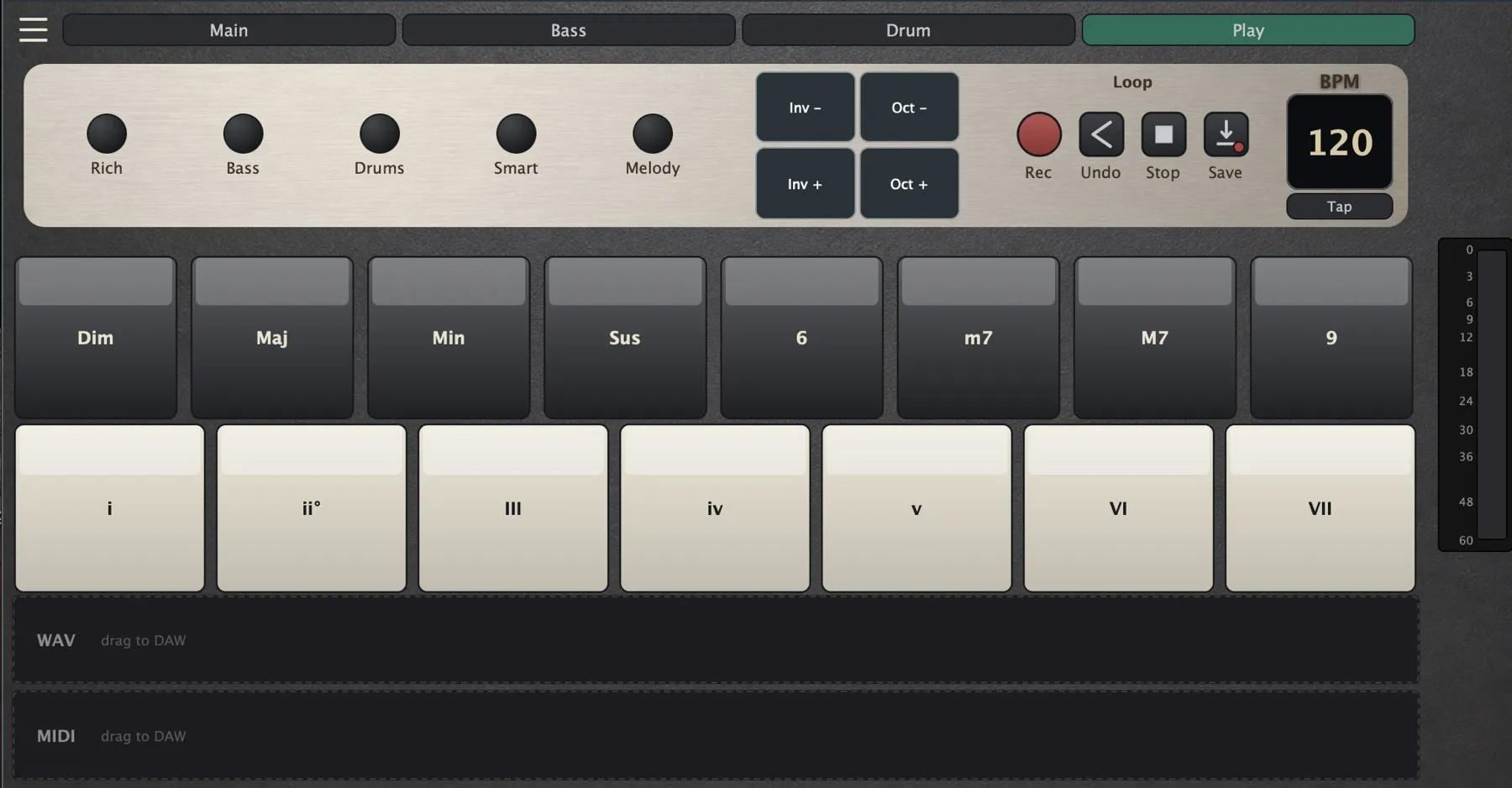
How a chord is made
- Shape: hold one of eight pads, Dim, Maj, Min, Sus, 6, m7, M7 or 9.
- Root: press a root pad. The roots are the notes of the scale you set, so every chord stays in key.
- A root on its own, with no shape held, plays that note with its octave. Handy for bass lines and quick melodies.
- Chords play in root position. Switch on Smart and each chord takes the inversion closest to the last one, so the voices move less. Inv nudges a single chord up or down.
- Rich spreads the chord wider, adding the root an octave up and the top note an octave down.
Play it from what you have
A MIDI keyboard plays the roots from its keys, and the shape pads are MIDI notes 96 to 103, or any pads you teach it with Learn Pad. A pad controller works the same way. With nothing plugged in, the computer keyboard does it: 1 to 8 hold the shapes, D F G H J K L ; are the roots.
Chord generator or chord pad?
A chord generator gives you progressions to pick from and writes them out as MIDI. still.synth doesn’t suggest anything. You choose each chord while you play, and it only makes sure the chord fits the key. That makes it closer to an instrument: you can jam, find a progression by ear, and repeat it the same way next time because it’s just two pads.
More than chords
Chords can be held, strummed, arpeggiated up or down, or stabbed in a rhythm on a step grid. A bassline follows them, the drum engine has 8 kits and 10 patterns in your DAW’s tempo, and the looper stacks up to 32 layers on a four-bar loop.
Into your DAW
Record a take and drag it onto a track as a WAV of the whole mix or as a MIDI file for your own sounds. Setup guides: Logic Pro, Ableton Live, REAPER, FL Studio, and the complete guide.
Questions
Is still.synth a chord generator?
Not in the usual sense. It doesn’t suggest progressions or write MIDI for you. You pick every chord yourself while you play, and the plugin makes sure each one is in key. If you want ideas handed to you, a generator is the better tool. If you want to play, this is.
Do I need to know music theory?
No. Pick a key and a scale, and every root pad is a note of that scale. Then you only choose the chord shape. Maj and Min are a good place to start.
Which keys and scales are there?
All 12 keys, and eight scales: Major, Minor, Dorian, Phrygian, Lydian, Mixolydian, Locrian and Harmonic Minor.
Can I use my pad controller?
Yes. By default the shape pads are MIDI notes 96 to 103, and Learn Pad maps them to any pad or key you press. Roots come from the keys of your keyboard.
Do I need a MIDI keyboard?
No. Hold 1 to 8 on your computer keyboard for a shape and play roots on D F G H J K L ;. It works in the Standalone app, and in the plugin while its window has focus.
Play it before you buy it
The home page has a live version of the chord pads — tap a shape and a root and listen.