How to use still.synth in Logic Pro
From an empty project to chords, bass and drums in Logic’s tempo — about two minutes.
Create a Software Instrument track, then load still.synth from the Instrument slot: AU Instruments → still.synth → still.synth Instrument → Stereo. Hold a root on your MIDI keyboard, press a chord-shape pad, and press play in Logic so the drums lock to your tempo.
-
Install still.synth
Run the installer from your download page. It puts the AU and VST3 plugins and the Standalone app in place, and Logic picks the AU up the next time it starts. macOS 11 or later, Apple Silicon and Intel.
-
Create a software instrument track
In a new or existing project choose Track → New Software Instrument Track, or click + above the track list. Pick MIDI → Software Instrument and click Create.
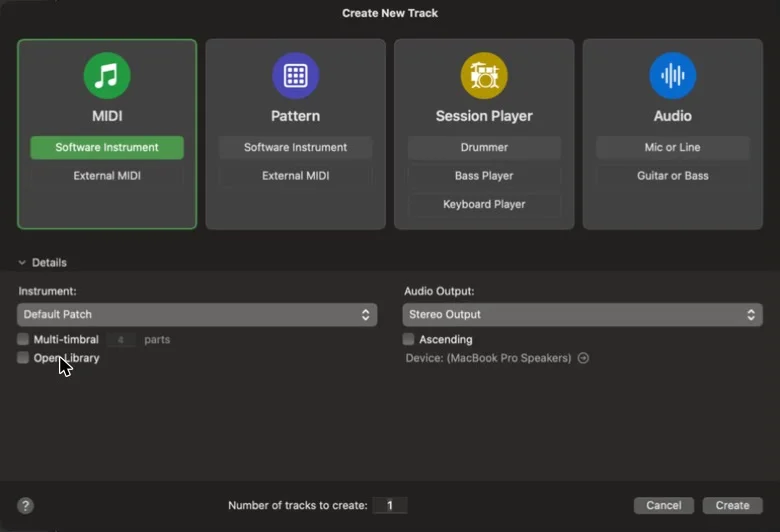
Logic’s Create New Track dialog with MIDI → Software Instrument selected -
Load still.synth
In the track’s channel strip, click the arrows on the right of the Instrument slot and go to AU Instruments → still.synth → still.synth Instrument → Stereo.
Want the bass and each drum on its own mixer channel? Pick Multi-Output (6×Stereo) instead: Main, Bass, Kick, Snare, Closed Hat and Open Hat each get their own output.
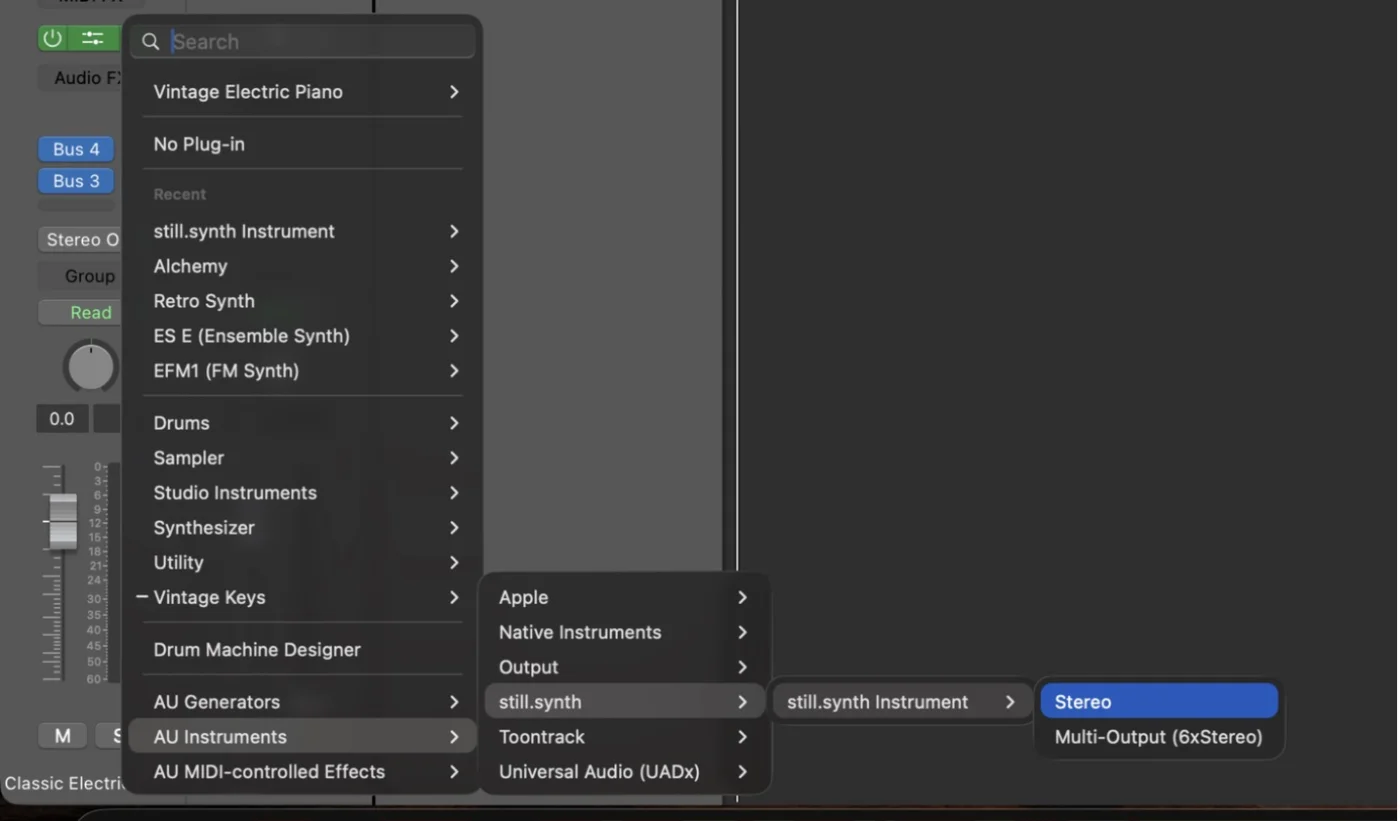
The Instrument slot menu: AU Instruments → still.synth → still.synth Instrument → Stereo -
Set the key and the sound
The Main tab holds the synth preset, the key, scale and style, how a chord plays back — held, strummed, arpeggiated or in a rhythm — and the mix. Every pad follows the key and scale you set here.
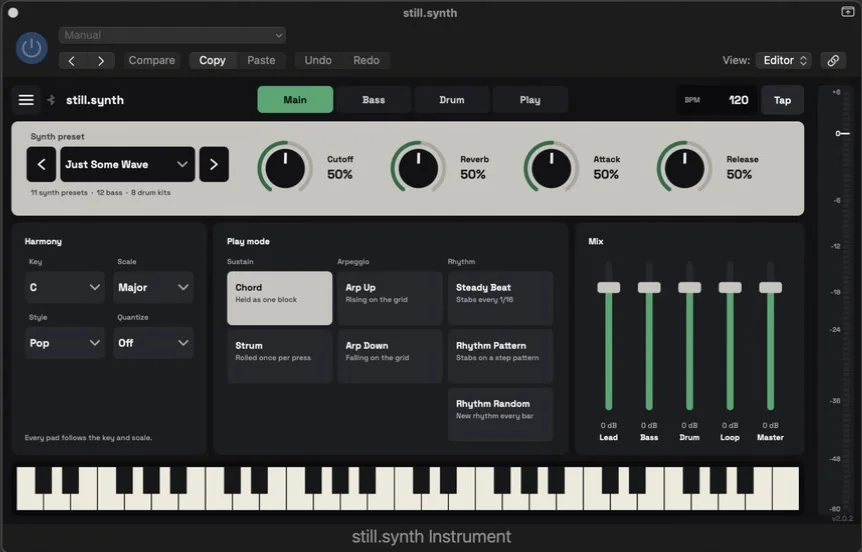
still.synth’s Main tab open on a Logic track -
Play chords
Open the Play tab and switch on the layers you want: Bass, Drums, Rich, Smart, Melody. Then hold a root on your MIDI keyboard and press a chord-shape pad — Dim, Maj, Min, Sus, 6, m7, M7 or 9.
Out of the box the shape pads answer MIDI notes 96–103. To use your controller’s own pads, open the mapping page from the ☰ menu, press Learn Pad and hit your first pad.
A root on its own plays an octave (with the Melody layer on, just the single root note). For a full chord, hold a shape at the same time — that’s what a controller is for. The Bass layer adds a bassline under your chords.
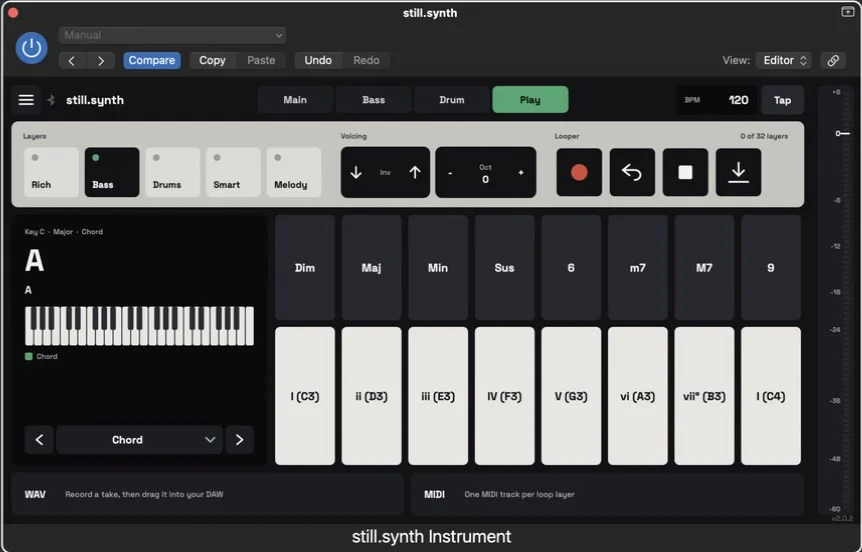
The Play tab: layer switches, voicing, looper, chord-shape pads and root pads -
Lock to Logic’s tempo and record
still.synth follows Logic’s tempo and transport: press play and the drums and arpeggios land on the grid.
To keep a take, record-enable the track and record in Logic as usual — Logic records the roots and shape pads you press, and still.synth plays them back the same way. Or build it up in the built-in looper, then drag the WAV or the MIDI (one track per layer) straight into Logic’s track area.
If something’s off
I play my keyboard and hear nothing.
Select the still.synth track or record-enable it — Logic only sends your keyboard to the selected track. Then check that a shape pad is pressed together with the root.
Logic doesn’t list still.synth.
Restart Logic after installing. If it’s still missing, open Logic Pro → Settings → Plug-in Manager, find still.synth and click Reset & Rescan Selection.
The window flickers when I press 1–8 on the computer keyboard.
Logic uses 1–9 for Recall Screenset and runs it even while a plug-in window is in front, so the window gets redrawn. still.synth still gets the key and plays. To stop the flicker, open Logic Pro → Key Commands → Edit Assignments, search for “Screenset” and clear the keys from Recall Screenset 1–8.
Play it before you buy it
The home page has a live version of the chord pads — tap a shape and a root and listen.